
521 Solutions: Running My Own Business on AI Workers I Can Audit
How I built an AI morning brief that reads my email, tasks, and calendar every day, and the controls that keep it from saying anything it should not.
At a glance
Before I sell AI workers to anyone, I run my own business on them. This case study is about the one I depend on most, a daily brief that tells me what matters before I open my inbox.
- Business
- 521 Solutions, my own consulting practice
- What it does
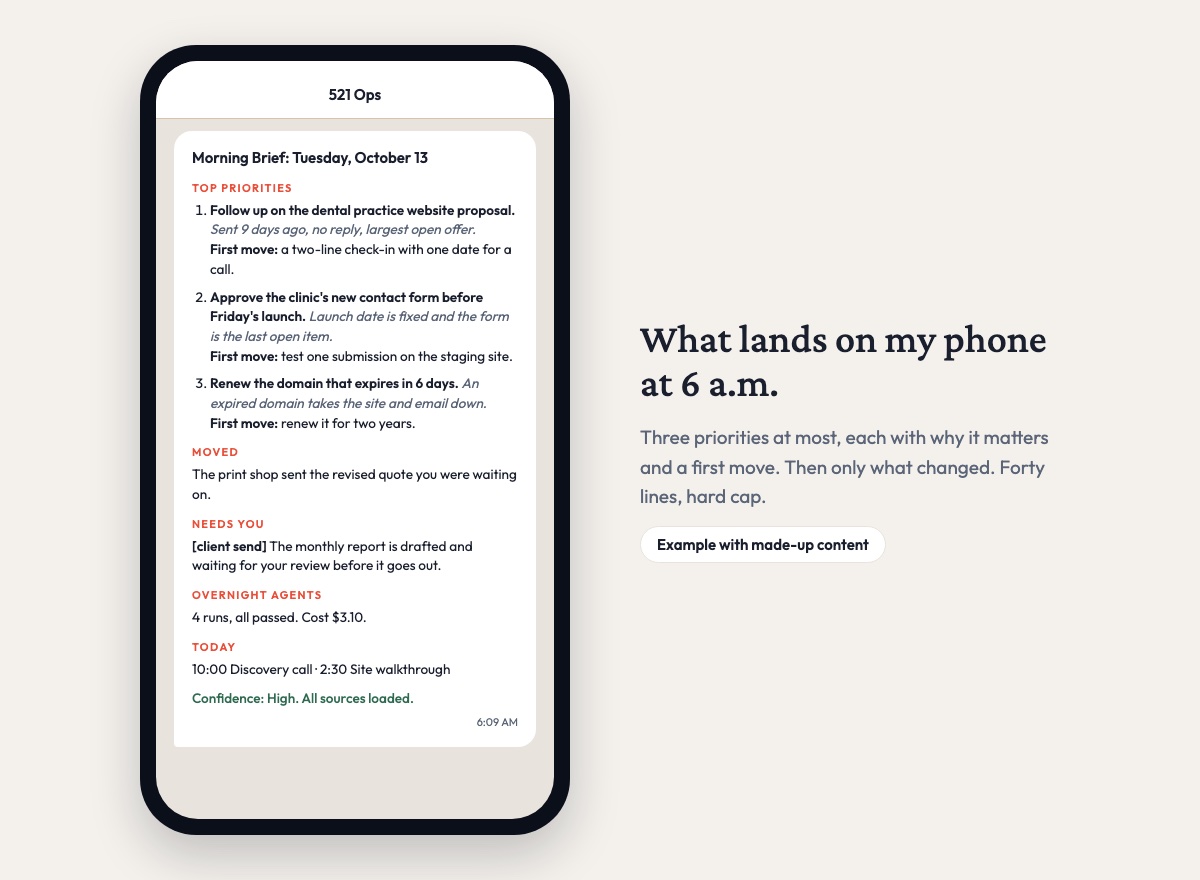
- Reads my task boards, email, and calendar, then sends a short, prioritized brief to my phone
- Briefs produced
- 60 in the first 76 days of automated runs
- Held back by safety checks
- 10, instead of being sent
- Cost per brief
- About $2.38 in AI usage, about 5 minutes of machine time
The situation
Every morning I faced the same pile: seven project boards, a full inbox, a calendar, and the health of the systems I run for clients. Sorting out what needed me that day ate time before I got to any work, and important things still slipped.
An AI assistant could summarize all of it. Handing an AI your inbox raises some fair questions, though. What happens if it gets something wrong and I act on it? Anyone can send me an email, and an AI that reads email can be manipulated by what someone writes in one. It might paste something sensitive, like health information from a client practice, into a message to my phone. And somebody has to check its work. An AI grading its own output doesn’t count.
How the AI morning brief works
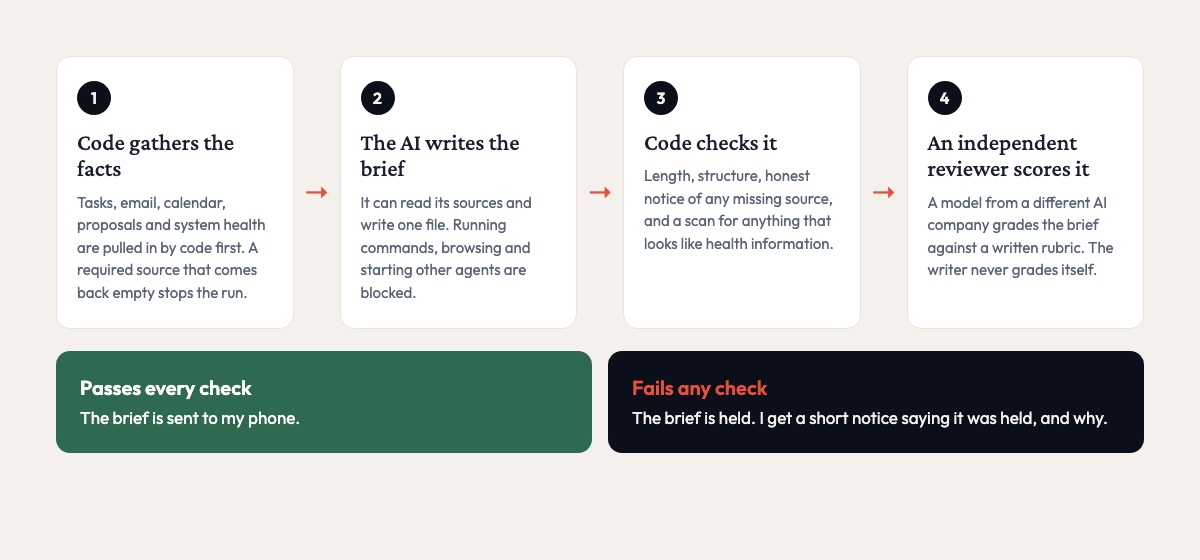
I built the brief as a governed AI worker. That means a defined role with written rules, a scoring rubric, a lifecycle, and a permanent record of every run. The design comes down to one rule: the AI does the work, and code keeps the record and decides whether the brief ships.
Before the AI starts, code pulls in the numbers the brief depends on, such as outstanding proposals and system health. If a required source comes back empty, the run stops instead of quietly working from incomplete information.
The AI itself has no shell. It can read its sources and write its brief. Running commands, browsing the web, and starting other agents are switched off entirely, and any text that arrives in an email or a task is treated as information to summarize, never as instructions to follow.
A record of the run is opened before the AI starts, so a crash leaves evidence behind. When the brief is written, a model from a different AI company, set to give consistent answers, grades it against the rubric. The AI that wrote the brief never grades itself. Code also runs its own checks on every brief: length, structure, whether it said so when a source was unavailable, and a scan for anything that looks like protected health information.
Only a passing brief gets delivered to my phone through Telegram. If any check fails, I get a short notice that the brief was held and why.
What went wrong while building the AI morning brief
For its first weeks, it never ran at all. A macOS security rule silently blocked the scheduled job, and nothing was alerting on it. Fixing the launcher fixed it, and the brief has run since.
The first version graded itself, and the grades told me nothing. In its first 17 runs, 16 self-scores landed in a narrow band between 89 and 92. A score that never moves isn’t measuring anything, so I removed self-grading entirely and added the independent reviewer.
I also learned that leaving a permission off the list doesn’t take it away. Broader settings on the machine can add permissions back, and on its first day under the new rules the AI ran shell commands in two runs. Risky tools are now explicitly blocked, and in every run since, shell use has been zero.
Results from the AI morning brief
| Metric | Result |
|---|---|
| Briefs produced since automated runs began | 60 in 76 days |
| Briefs reviewed by the independent reviewer | 50 |
| Briefs held back instead of delivered | 10 |
| Longest hold | 5 days in a row, on a possible health-information flag |
| Shell commands run since the block was added | 0 |
| Typical run time | About 5 minutes |
| Typical AI cost per brief | About $2.38 |
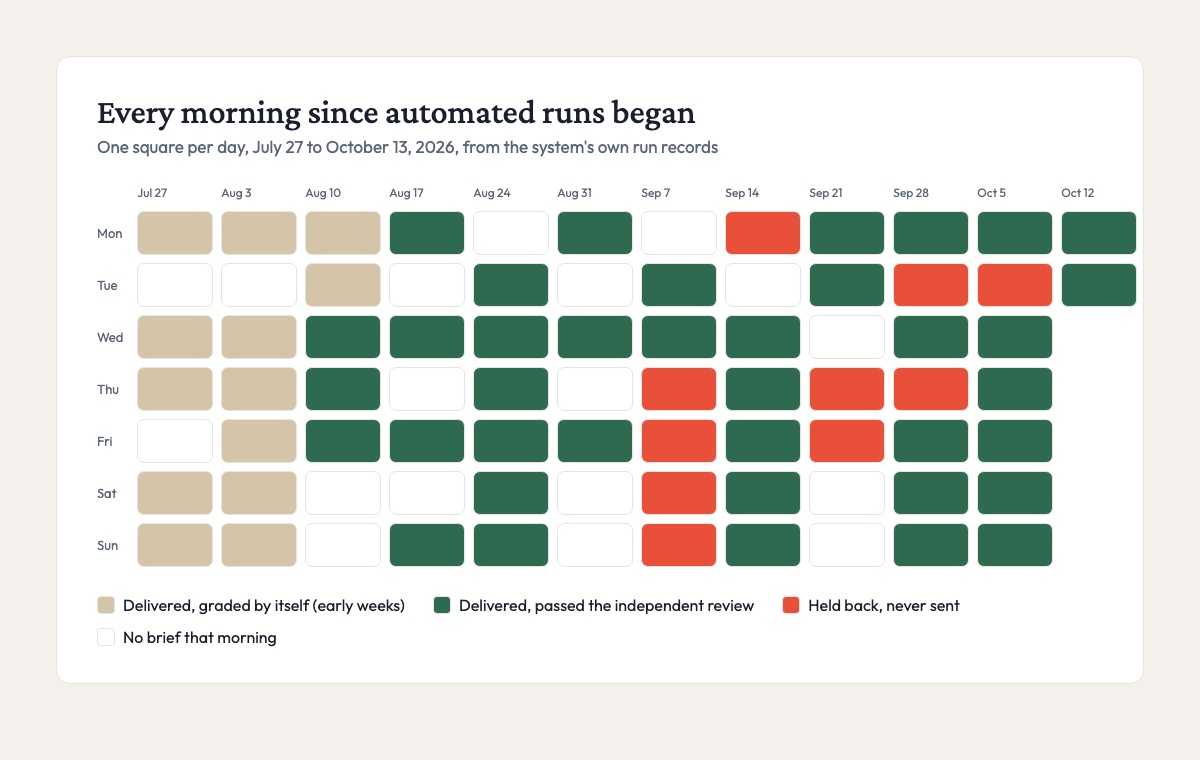
The number I value most is the 10 held briefs. On five straight days in September, the health-information scan flagged something that looked like a date of birth, and those briefs never reached my phone. I want a system that will refuse to send something on its own, without me watching it.
It still has gaps. Some mornings it doesn’t run, usually because the computer it runs on was asleep, and about one run in five fails outright. When that happens I get told, so a missing brief shows up as a missing brief instead of a quiet gap in my morning.
The platform behind it
The brief runs on the same platform I use for client work. Today that platform manages 32 AI workers, each with a defined role and a lifecycle from draft to production. It also holds 21 evaluation suites and runs health checks across 71 pieces of infrastructure, from websites to phone numbers. Every promotion, audit, and run leaves a record.
If you are putting AI near your inbox
Don’t let the AI that does the work be the one that grades it. Have something independent check the output, and let code decide what ships. If the assistant reads messages from outside your business, take away anything it doesn’t need, especially the ability to run commands, and block those abilities explicitly rather than just leaving them off. And expect it to fail sometimes. What you want is a setup that tells you when it does.
Want AI workers you can trust?
I build governed AI workers for small businesses. They handle day-to-day work, and they come with the checks, records, and limits that let you rely on them. If you want help deciding where AI fits in your operations, let’s talk.